Agency Systems Audit
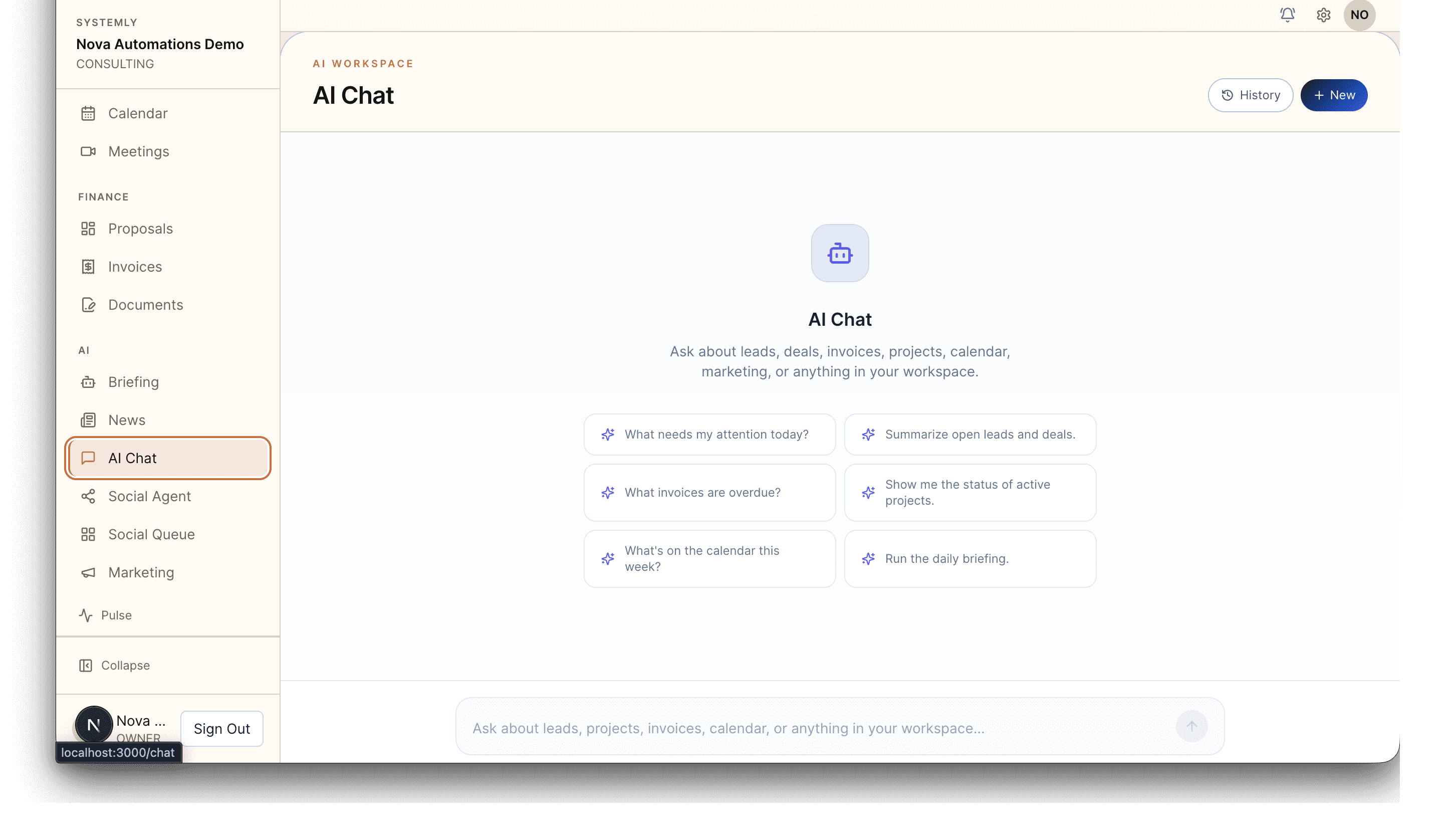
All active engagements, intake forms, deliverables, and recommendations live in one workspace — searchable via grounded AI chat.
For Independent Consultants & Fractional Ops
You sold the project. Now you're losing hours a week tracking where each client engagement actually stands.
No tech prep needed. We'll guide you.
One view of all clients
Active engagements, deliverables, and next actions visible at a glance — no mental juggling.
Ask what you recommended
AI chat grounded in your actual client notes, proposals, and deliverables — pull up past recommendations in seconds.
Invoicing + intake automated
Intake questionnaires, invoice follow-up, and client scheduling run on their own so you spend more time billing.
A day in the life
See how The Business OS for Independent Automation & Ops Consultants teams go from chaos to clarity
Skim WhatsApp, Slack Connect, and email for overnight client messages. Respond to what you can remember
A client asks what you recommended about their email flow three months ago. Search Loom + Notion + Google Docs for 30 minutes
Send a manual reminder to a client whose invoice is two weeks overdue. Feel awkward about it
New client signed yesterday. Spend an hour sending intake questions, scheduling kickoff, and setting up a Notion page
Realize a retainer ended ten days ago. Quickly email the client hoping they haven't moved on
Try to figure out which engagements are wrapping this month. Open five tools, give up
Open the client dashboard: overnight messages consolidated, unreplied items highlighted
Ask the AI chat: "What did I recommend to [client] about email flow?" Answer appears in seconds, sourced from your actual notes
Overdue invoice triggered a polite auto-reminder yesterday. Client replied with payment link clicked
New client onboarding triggered: intake form sent, kickoff booked via Cal.com, project shell auto-created
Retainer renewal fired 14 days before end. Pitch is in the client's portal awaiting review
Capacity view shows exactly which engagements wrap this month and where the pipeline is
Real scenarios from The Business OS for Independent Automation & Ops Consultants teams we’ve worked with
Solutions
We match your specific challenges with the right solution package. Each one is designed to fit where you are now and where you want to go.
All active engagements, intake forms, deliverables, and recommendations live in one workspace — searchable via grounded AI chat.
Standardized intake, per-engagement project templates, client portals, automated invoicing, and retainer renewal all wired together.
Ongoing tuning as your practice adds services or clients. Keeps proposals, reports, and intake forms current without you becoming the ops person.
Common challenges
Impact: One missed detail burns a referral relationship. Consulting runs on reputation and every dropped ball is a direct hit to next month's pipeline.
Impact: Client comms fragmentation is a top reason consultants lose retainers. Missed context reads as unprofessional even when you are doing great work.
Impact: Every admin hour is an hour not billing. Scaling past $10k/mo without hiring means automating the admin or capping income.
Impact: Institutional knowledge lives in scattered artifacts. When clients need continuity, you rebuild it from memory.
What we build
Templated intake and discovery call booking that captures the context you need before the kickoff.
Each engagement gets its own project with deliverables, timeline, and stakeholder visibility in the client portal.
Ask "what did we recommend to [client] in Q1?" and get a real answer from real notes — not a hallucination.
Package end dates trigger outreach sequences so renewals are proactive, not missed.
Don't see your exact setup? We work with most systems you already have and tie them together so you get time back for the work that actually makes you money.
Results
The practical improvements these setups are designed to support for Automation Consultants teams.
Every active client engagement shows status, deliverables, and next actions in one view
Grounded AI chat pulls from your real notes and proposals so past work is always within reach
Intake, invoicing, and renewal outreach automate so consulting hours go to billing hours
Integration
We integrate with the tools Automation Consultants teams already use. No forced migrations, no platform lock-in.
Don't see your tool? We work with most platforms and can build custom integrations.
Templates
Start with the DIY templates that match how Automation Consultants teams handle pricing, intake, and follow-up. Use them now, then upgrade to a full system when you are ready.
Before you implement, estimate how much revenue and profit is at risk from missed calls and slow follow-up in your current workflow.
Open Missed-Call CalculatorYes. Starter ($20/mo) includes CRM, projects, proposals, invoicing, the client portal, 300 AI chats/mo, and 25 AI credits. Growth and Pro add seat count and advanced automations.
Yes. Each client gets their own portal with scoped visibility to their projects, invoices, and shared documents.
Per-client scoping is built into the data model. Client-specific notes and documents are only visible inside that client's record and portal.
The chat is scoped to your tenant — your clients, projects, proposals, notes, and knowledge base. It won't hallucinate about clients you don't have.
White-label portal is a Pro feature ($179/mo). On Starter and Growth the portal carries a subtle Systemly attribution.
Cal.com is the preferred scheduling integration (Calendly works too). Stripe is the canonical payment integration for subscriptions, invoices, and credit packs.
Contact
The form will be ready in a moment.